- bullet 1
- bullet 1
- bullet 1
- bullet 1
- bullet 1bullet 1
- bullet 1
- bullet 1
- bullet 1
Saturday, June 1, 2013
This is a test post 1
Have you got the new Windows 8 installed on your PC or laptop? Congratulations.
The story does not end here. You need to optimize your new OS for better and speedier performance. But how to make Windows 8 perform better, follow these simple steps.
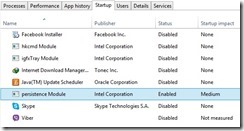
Second option to make Windows 8 faster is to ‘Pin-point applications.’ To do this, right click on the Taskbar and open Task Manager. You would find ‘More Details’ option and here you would see a list of certain programs highlighted.
The story does not end here. You need to optimize your new OS for better and speedier performance. But how to make Windows 8 perform better, follow these simple steps.
- Firstly you need to customize certain systems of Windows 8. There are few programs that can consume maximum resources and make the system to slowdown. You can identify and disable or stop such programs in two ways:
At times, the start-up programs can slowdown the system. Windows 8 Task Manager provides you the option to identify such programs and disable them. To do this first launch Task Manager, select Start-up and selectively disable the programs.

Second option to make Windows 8 faster is to ‘Pin-point applications.’ To do this, right click on the Taskbar and open Task Manager. You would find ‘More Details’ option and here you would see a list of certain programs highlighted.
Subscribe to:
Posts (Atom)